



Why we create a website? Why we need it? Now a days, why it becomes very important for every individual and organization to have an online presence? The answer will be ; Because it is the place where people craft your first image in their mind. Website is the first place to make a good impression in the users mind. It is the place from where you can get good potential clients, customers, users, fans, etc. So what if they want to contact you yo give a feedback, suggestion, business proposal or just wanted to say Hi ? They will simply click on the Contact us button from the menu. And if you provide them a beautiful and simple user interface with really awesome user experience then you certainly make a good impression.
Design a contact form in such a way that it will seduce (yeah… it should be so) the user to use it. And when push the submit button say thanks to him with a Smile !
In this tutorial I tried to achieve those things which I mentioned above. So, let’s start…
HTML
First we will link our CSS and JavaScript files to the html page. Where the contact_form.js is working with the help of contact.php to show the notifications with the smooth drop-down effect. contact.php will validate the input fields. And jquery-1.3.2.min.js and jquery.js are our JavaScript libraries.
<!-- CSS -->
	<link rel="stylesheet" href="style.css" type="text/css" />
        <link rel="stylesheet" href="header.css" type="text/css" />
	<!-- JAVASCRIPT -->
	<script type="text/javascript" src="js/jquery.js"></script>
	<script type="text/javascript" src="js/contact_form.js"></script>
	<script type="text/javascript" src="js/jquery-1.3.2.min.js"></script>
Let’s make the contact form simple to use by asking the user to fill only three fields : Name, email and message.
<!-- CONTAINER --></pre>
<h2>Slick Contact Form <span>Using jQuery and PHP</span></h2>
<div class="container"><!-- FORM -->
<div id="form">
<h3>Say hi...!</h3>
<form id="ajax-contact-form" action="javascript:alert('success!');">
<fieldset class="info_fieldset">
<div id="note"></div>
<div id="fields"><input class="textbox" type="text" name="name" value="" />
 <input class="textbox" type="text" name="email" value="" />
 <textarea class="textbox2" name="message" rows="5" cols="25"></textarea>
 <input class="button" type="submit" value="Send Message" /></div></fieldset>
</form></div>
 <!-- END FORM --></div>
<pre>	<!-- END CONTAINER -->
CSS
In CSS, first we will define the form container and the notification area. In notification are we will be showing the error/success notification and that also in a cool way !
/*contact form*/
#form {width:500px;
	position: absolute;
	padding: 18px 6% 60px 6%;
	margin: 0 auto;
	background: rgb(247, 247, 247);
	border: 1px solid rgba(147, 184, 189,0.8);
	-webkit-box-shadow: 0pt 2px 5px rgba(105, 108, 109,  0.7),	0px 0px 8px 5px rgba(208, 223, 226, 0.4) inset;
	   -moz-box-shadow: 0pt 2px 5px rgba(105, 108, 109,  0.7),	0px 0px 8px 5px rgba(208, 223, 226, 0.4) inset;
	        box-shadow: 0pt 2px 5px rgba(105, 108, 109,  0.7),	0px 0px 8px 5px rgba(208, 223, 226, 0.4) inset;
	-webkit-box-shadow: 5px;
	-moz-border-radius: 5px;
		 border-radius: 5px;
		 text-align:center;}
/*CSS for Error notification*/
.notification_error{
	border: 1px solid #f1dfc5;
	height: auto;color: #ca5702;
	padding: 10px;
	margin: 10px auto;
	text-align:left;
	-moz-border-radius:5px;
	margin-bottom:10px;}
/*CSS for Successfully sent notification*/
.notification_ok{
	border: 1px #cbcf8e solid;
	height: auto;padding: 10px;
	margin:0 auto;
	background: #f5f9fd;
	text-align: center;-moz-border-radius:
	5px;margin-bottom:10px;}
Now the following css will define the styling for textbox and textarea
/*CSS for textarea (Name and email)*/
textarea{
	width:400px;margin: 10px auto;
	padding: 5px;
	border: 1px solid #cccccc;
	color: #333333;
	font: 12px Verdana, Helvetica, Arial, sans-serif;
	-moz-border-radius: 3px;
		-webkit-appearance: textfield;
			-webkit-box-sizing: content-box;
	-moz-box-sizing : content-box;
		box-sizing : content-box;
			-webkit-border-radius: 3px;
	-moz-border-radius: 3px;
		border-radius: 3px;
			-webkit-box-shadow: 0px 1px 4px 0px rgba(168, 168, 168, 0.6) inset;
	-moz-box-shadow: 0px 1px 4px 0px rgba(168, 168, 168, 0.6) inset;
		box-shadow: 0px 1px 4px 0px rgba(168, 168, 168, 0.6) inset;
			webkit-transition: all 0.2s linear;
	-moz-transition: all 0.2s linear;
		-o-transition: all 0.2s linear;
			transition: all 0.2s linear;}
/*CSS for textbox (Message)*/
.textbox {
	width:400px;height:25px;
	margin: 10px auto;
	padding: 5px;
	border: 1px solid #cccccc;
	color: #333333;
	font: 12px Verdana, Helvetica, Arial, sans-serif;
	-moz-border-radius: 3px;
	-webkit-appearance: textfield;
	-webkit-box-sizing: content-box;
	  -moz-box-sizing : content-box;
	       box-sizing : content-box;
	-webkit-border-radius: 3px;
	   -moz-border-radius: 3px;
	        border-radius: 3px;
	-webkit-box-shadow: 0px 1px 4px 0px rgba(168, 168, 168, 0.6);
	   -moz-box-shadow: 0px 1px 4px 0px rgba(168, 168, 168, 0.6);
	        box-shadow: 0px 1px 4px 0px rgba(168, 168, 168, 0.6);
	-webkit-transition: all 0.2s linear;
	   -moz-transition: all 0.2s linear;
	     -o-transition: all 0.2s linear;
	        transition: all 0.2s linear;}
.textbox2 {height:140px;}
/*CSS for submit button*/
.button {width: 25%;
	cursor: pointer;
	background: rgb(61, 157, 179);
	padding: 4px 5px;
	font-family: 'BebasNeueRegular','Arial Narrow',Arial,sans-serif;
	color: #fff;
	font-size: 24px;
	border: 1px solid rgb(28, 108, 122);
	margin-bottom: 10px;
	text-shadow: 0 1px 1px rgba(0, 0, 0, 0.5);
	-webkit-border-radius: 3px;
	   -moz-border-radius: 3px;
	        border-radius: 3px;
	-webkit-box-shadow: 0px 1px 6px 4px rgba(0, 0, 0, 0.07) inset,
	        0px 0px 0px 3px rgb(254, 254, 254),
	        0px 5px 3px 3px rgb(210, 210, 210);
	   -moz-box-shadow:0px 1px 6px 4px rgba(0, 0, 0, 0.07) inset,
	        0px 0px 0px 3px rgb(254, 254, 254),
	        0px 5px 3px 3px rgb(210, 210, 210);
	        box-shadow:0px 1px 6px 4px rgba(0, 0, 0, 0.07) inset,
	        0px 0px 0px 3px rgb(254, 254, 254),
	        0px 5px 3px 3px rgb(210, 210, 210);
	-webkit-transition: all 0.2s linear;
	   -moz-transition: all 0.2s linear;
	     -o-transition: all 0.2s linear;
	        transition: all 0.2s linear;
			text-align:center;}
.button:hover{
	background: rgb(74, 179, 198);
}
PHP
contact.php
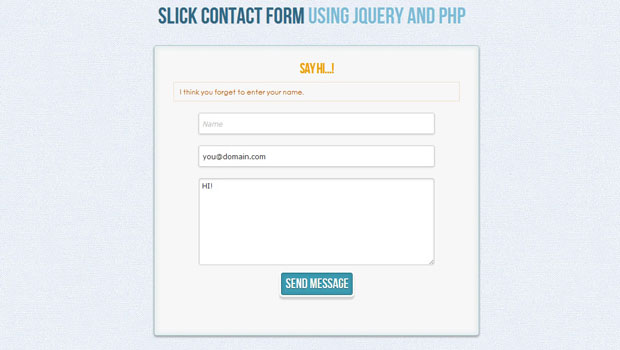
contact.php will validate the data which is put into the text fields are valid or not and request the JavaScript file to show the respective message to the user. You can customize the notification messages as per your need.
<!--?php <br ?-->
include 'config.php';
	error_reporting (E_ALL ^ E_NOTICE);
	$post = (!empty($_POST)) ? true : false;
if($post)
	{
		include 'functions.php';
		$name = stripslashes($_POST['name']);
		$email = trim($_POST['email']);
		$message = stripslashes($_POST['message']);
		$error = '';
// Check name
if(!$name)
	{
		$error .= 'I think you forget to enter your name.
';
	}
// Check email
if(!$email)
	{
		$error .= 'I think you forget to enter your e-mail id.
';
	}
if($email && !ValidateEmail($email))
	{
		$error .= 'Invalid E-mail id !!!
';
	}
if(!$error)
	{
		$mail = mail(WEBMASTER_EMAIL, $subject, $message,
     		"From: ".$name." \r\n"
    		."Reply-To: ".$email."\r\n"
    		."X-Mailer: PHP/" . phpversion());
if($mail)
	{
		echo 'OK';
	}
}
else
	{
		echo '</pre>
<div class="notification_error">'.$error.'</div>
<pre>';
	}
}
?>
config.php
And now the most important part of the whole contact form, yes the email id where you want to receive the emails which are sent from our this contact page. You just have to replace the email id in this file with your email id and that’s it, you are done !
<?php // To define("WEBMASTER_EMAIL", '[email protected]'); ?>
So, in this way we have created a Slick Contact Form using jQuery and PHP and you can have a look at the demo here,




Thanks! but it seems that the download link can’t work? I found a 404 error.
Thanks Sean,
The problem is resolved. Sorry for the inconvinience.
You can download it now…
Thanks for your work!
Thanks so much! Works great and looks beautiful. I just need to change colors to match my site.
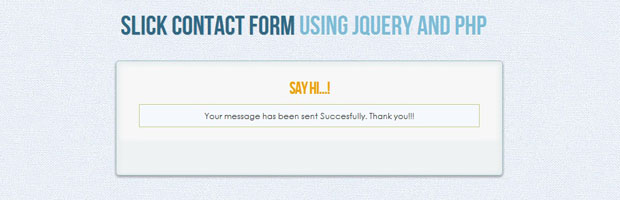
I’m not finding is where to put the phrase “Your message has been sent successfully. Thanks!” Like you have it on your demo. As it is now, it’s just a blank box after the message is sent, which would be confusing for the sender.
Thanks again!
Hello Jason,
You will find this message in js/submitform.js file.
In line no 47 you can customize your message…
Let us know as soon as you successfully customize the form.
Cheers !
Hey D, thanks for the response. I found it, but I don’t understand why it’s not showing up. I’m not great with php, so I’m sure it’s user error, but I thought I placed everything correctly. I’ll keep looking to see what I’ve done wrong, but if you happen to have a moment to look, it’s located at: http://ryderjason.com/contact.html . Feel free to send a test email to see what I mean.
Hey Jason,
It is showing the success message. Just change the background color of class .notification_ok to some
other color from white. Because the font color and the background color both are same i.e. white and
thats why u r unable to see the message.
Aw geez. Always the little things. At least it’s an easy fix. Thanks a lot for helping me out and for making such a nice contact form!
You always welcome Jason..!!!
Hope you will find some more cool stuff in future….
Hi-This is really lovely, but I have two questions. 1) I need to have a subject line in the email sent to client (so they know where the form came from). I tried adding it to the contact.php but it screwed everything up. : ( and then 2) is there a way to prevent the autofill from showing up after submit? It looked beautiful the first time loaded, but after submit, no more JQ transitions at all. And I can’t seem to show JQ at all in chrome or safari-only Firefox Mac.
And I guess 3) I cannot find where the italic style is coming from! Where can I remove that?? Thanks!
1) Please add this line after the Email label
It will work with this… If you find any difficulty the let us know…
2) I didnt get this
3) For italic issue, edit or remove the line no 186 in style.css file
Thanks! But I actually wanted to just have the subject named through the config file, not add another field to the actual form. I just need the form to always be identified as “Contact from from xyz.com” but I do not want to add to the form. I tried editing config and contact, but just got errors. And I can’t get your example to work the JQ in Chrome or Safari OSX either. : ( And clearly the style I just didn’t open the file up and was only looking through DW CSS panel. Duh.
Will try to work on the default Subject line and let you know asap
great job!!
But the validation on the email when the user is giving a incorrect emailadres doesn’t work.
Thanks!
Can you please give us an email id which is not getting validate, so that we can cross check the issue
you can check it out on the demo in this site. Its also not working when you remove .com on the email, its still sending. I found out that eregi is not working in my php version, i use preg_match instead.
best regards
This is the best form I’ve found so far. The only issue I’m having is receiving any emails from “gmail” accounts if they’re using Firefox. I’ve tried several different email hosting accounts and they all work except gmail. If the user puts a gmail account in the email field, I won’t get it. Any fix for this?
Great script! If I wanted to add another field called “Phone” and “Company”, how would I do it? Thanks a lot!
Do you want to make it compulsory?
That would be great. I would like it be included along with the $message so I believe it’ll be included with the email content. Thanks a lot!
Something like this:
Name: Bob
Company: Google
Phone: 123-456-7789
Email: [email protected]
Message: This script is great!
Thanks for this fantastic form. My only question is why two jQuery libraries are required? Can I just get the latest and use that one? Thanks again.
Nice work
how can u add bcc as i want the email sent to several different recipients